
Note! 50+ Ways is no longer being updated here but over at the new site for 50+ Web 2.0 Ways to Tell a Story-- http://50ways.wikispaces.com/ It has more organizational features and includes ways for you to add content to the site once you join the new wiki.
How Do I Come Up With a Story Idea?

This workshop (nor this presenter) pretend to be an authority on the subject of Storytelling. For the purposes of this workshop, you need to think of a rather short concept that can use perhaps 4-8 images, text, maybe audio or music to bring a story to life on the web.
A story can be broader than a personal tale of a dog (!)-- it can be a presentation, a project report, an idea pitch, a teaser for a class topic. if you are doing this in one of my workshops, time is limited, and you will want to pick something quickly, and not worry about it being worthy of a national art prize (!). The purpose here is to experience the creative aspects provided by the web tools. And remember that you will need to find images and other media from public collections that can represent the characters, places, or metaphors in your story- so try to think of ideas that lend themselves to visuals and media
But first, for fun, let's give you an example of how not to tell a story (and why the story approach is important even for presentations) -- see if this version of Cinderella is as touching as the story you remember. (Power Point 20th Anniversary Cinderella is a clever Slideshare by Rowan Manahan.... Slideshare is one of the 50 tools!).
Try a Story Idea Prompt
So if you are stuck for ideas, here are some prompts:- What was your favorite childhood pet?
- Where was your most memorable vacation?
- What topic most inspired you in grade school?
- Where is a place in the world you'd like to visit?
- What is the most adventurous thing you have done?
- Who was an influential authority in your subject discipline?
- Or just describe a collection of things such as
- Five attributes of a great writer
- The top technology gadgets of the future
- Most important discoveries in your field
- Favorite cars, vegetables, flowers, tools
- Collection of things that don't belong
It need not be an epic or a best seller! Think short, and think of something that is going to have media, especially images that can describe your elements, especially if they have metaphors.
So, let's say I try the question on "Where is a place in the world you'd like to visit?". This is how I might sketch out my story as an outline.
- I've never been to Africa, but wish to go on a safari
- One day I will fly to say, Kenya, and say head out to the bush country, with a set of trusty guides
- I will see elephants up close
- We will have a close call with a lion
- The nights will bring campfires, stories, and camaraderie
- As I return home, I begin to wonder about the own wilderness in my own land, and if I appreciate it as much as a strange land.
Or Start with a Visual
Some people are more creative in a visual mode, so another way is to find an image that moves, inspires, disturbs, or affects you, and build a story around the image. For example, searching on the flickr creative commons collection:- Sunrise- a time to re-energize, start over...
- Road - a theme of travel, movement, going somewhere
- Despair - devastation, loss of hope, travesty
- Grandmother- someone special in your life
Stretch Your Imagination Muscles
Are you spinning your wheels? How about some activities you can try to stimulate your creative juices.- Explore some mystery places in a VoiceThread
- Play Five Card Nancy or Five Card Flickr
- Generate a phrasr
- Join the writing of One Million Monkeys
- Explore a blueful world
50 Dog Stories
For the story I will use as an example in the workshop, that was originally 60 second in length as a video, I had 18 images-- they are available as a flickr set and as an album in Picassa. I have a script written out, which I have set up as a storyboard and can also be used to cut and paste into the web tools.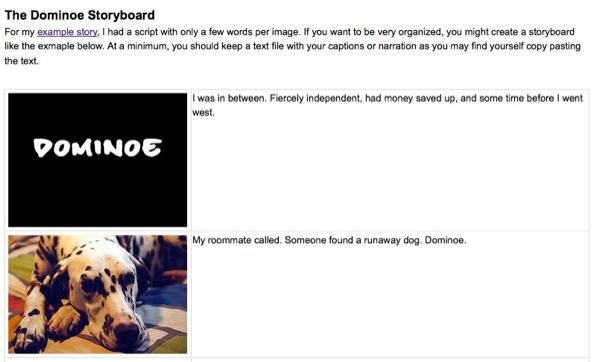 |
| dominoe storyboard |
I have an audio file of my voice, saved as an mp3. I collected some video clips (also assembled them as a playlist on YouTube) including a video of the entire story, plus I made one that is an intro of me talking about the story, and found a few creative commons licensed ones on the Internet Archive. So before I even tried these tools, I had my story in text form, and I had supporting audio, video, and images.
What to Do
For this workshop, you may want to think even more scaled back to get started. Create a bulleted outline and try to aim for starting with 4-6 key images that would work to get you started. With all of these tools, you can return to add new images, re-order the slides, etc.- Don't spend a whole lot of time coming up with an idea- just pick something you can accomplish for the purposes of this workshop. Once you have some experience, you can plunge into that ward wining riveting tale!
- Write out the elements of your story in bullet points- you can do this on paper, but please click the discussion tab above and leave your ideas here a scratch pad (and it may help the next workshop group!)
- For each bullet item in your outline, list possible ideas for visual or media metaphors you will need
Thinking visually, I may think I need to find images of African wildlife, perhaps a plane or a map showing Kenya, photos of a campfire, and maybe an iconic landscape shot of American wilderness. And important lesson is you do not always need literal images; consider finding images that can be metaphors).
More Storytelling Resources
Here are some other references that may help with the story creating process.- The Elements of Digital Storytelling (University of Minnesota) What is unique about the digitial environment? How do users respond to it? How can its potential be maximized? The Institute for New Media Studies and New Directions for News are investigating these questions.
- Digital Storytelling Cookbook (Center for Digital Storytelling) In all communities, in all cultures, stories evolve from the culinary experience. Making media, like making a meal, requires guidance, learning from our friends through the sharing of recipes and from those who spend their professional lives in the kitchen. We have helped over 10,000 people mine stories from their lives and personal media archives. Our cookbook shares our experience, some recipes and some humour to help you get started with your own storytelling experience.
- The Art of Storytelling (We Are Media) This module will cover why storytelling is an essential component of your strategy, how to compose effective stories, and look at excellent examples of nonprofit storytelling in a social media strategy.
- The DAOW of Storytelling (Jason Ohler) Digital, Art, Oral and Written literacies- the DAOW of literacy - are crucial for personal, academic and workplace success in the Digital Age and blend very well in a digital storytelling environment. In my digital storytelling workshops we address how oral and written storytelling, as well as storytelling using digital and art skills, are involved in the creation of digital stories, and how all these literacies and forms of storytelling can reinforce each other. This improves literacy and expression in all areas.
- Master Storytellers (TED videos) Less a "how to" these videos should unlock some ideas for creative communication
- DigitStories a resource site by the creator of the BBC's Capture Wales project
- Web 2.0 Storytelling resource and open discussion of our article from EDUCAUSE Review
Now you are ready for step 2... find some of your media
If you have specific feedback, questions, or just some kibbles to share, you can post your thoughts to the discussion area for this wiki page.
This wiki was hatched in 2007 by Alan Levine for a workshop as part of a tour for the Australian Flexible Learning Framework and has continued to evolve from there. Everything here is open to be linked, re-used, re-mixed, stolen, etc. This particular page was created on Jul 19, 2007 9:27 pm by -
 cogdog and has been edited 19 times. The last tweak was made on Jun 21, 2011 12:01 am Share freely and often and voraciously by linking to http://cogdogroo.wikispaces.com/50+ways